Google’s Find Hub

Features of Google’s Find Hub
Find Your Device
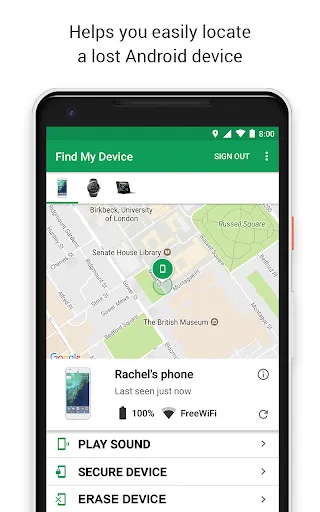
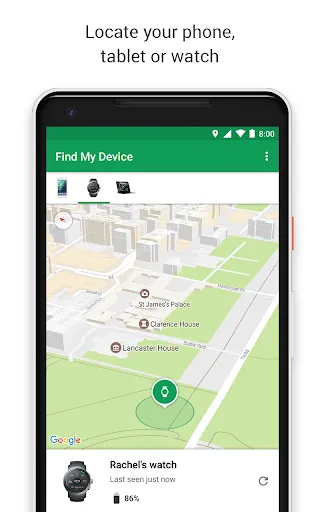
You can use Google Find My Device to locate and lock your lost Android device. See where your phone, watch, or tablet is located or where it was last used on a map.
Precise Search
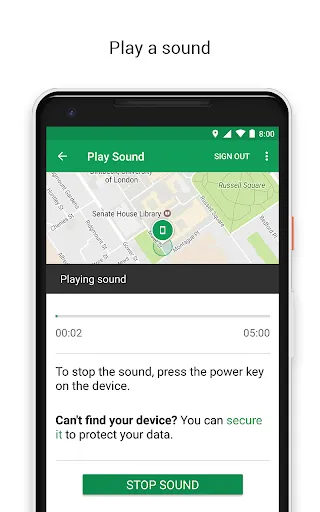
Google Find My Device provides indoor maps to help you find your device in malls, airports, or other buildings, and you can also use Google Maps to guide you. You can also make your device play sounds so you can find it faster.
Easily Modify Information
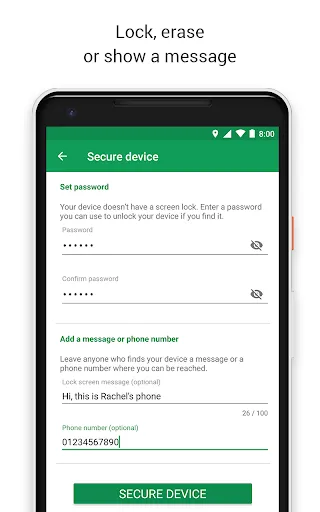
You can empty or lock your device yourself so you don't have to worry about data leakage during a loss. You can also set up a message or phone number to be displayed on the lock screen so that the person who finds it can easily contact you. At the same time, Google Find My Device also allows you to check the power status of the lost device.
Tips
👀 Set up and familiarize yourself.
Ensure your devices are set up with Google Find My Device as soon as possible. This proactive step means you'll be prepared if a device ever goes missing. Familiarize yourself with the app's interface and features, such as locating your device on a map, playing a sound to help find it nearby, or remotely locking or erasing it if necessary.
🤔 Utilize indoor maps for large locations.
Take advantage of the indoor maps feature when you're in places like airports, malls, or other large buildings. This tool helps you pinpoint the exact location of your device within these complex environments, making retrieval quicker and more efficient.
🔐 Prepare for security scenarios.
Plan ahead by configuring security settings like adding a custom message and contact information to your device's lock screen via the app. This information can assist someone who finds your device in returning it to you. Additionally, understand how to remotely erase your device if it's irretrievable, ensuring sensitive information remains secure.
Pros & Cons
- Locating Lost Devices
- Device Status Monitoring
- Remote Device Management
- Limited to Android Devices
Ratings
Similar Apps








Top Apps